This is default featured post 1 title

Go to Blogger edit html and find these sentences.Now replace these sentences with your own descriptions.

This is default featured post 2 title

Go to Blogger edit html and find these sentences.Now replace these sentences with your own descriptions.

This is default featured post 3 title

Go to Blogger edit html and find these sentences.Now replace these sentences with your own descriptions.

This is default featured post 4 title

Go to Blogger edit html and find these sentences.Now replace these sentences with your own descriptions.

This is default featured post 5 title

Go to Blogger edit html and find these sentences.Now replace these sentences with your own descriptions.

Showing posts with label Code. Show all posts

Thursday, 26 July 2012

PHP Switch Statement - Syntax - Multiple case - Default Case - Example


PHP Switch Statement


In the previous lessons we covered the various elements that make up an If Statement in PHP. However, there are times when an if statement is not the most efficient way to check for certain conditions.

For example we might have a variable that stores travel destinations and you want to pack according to this destination variable. In this example you might have 20 different locations that you would have to check with a nasty long block of If/ElseIf/ElseIf/ElseIf/... statements. This doesn't sound like much fun to code, let's see if we can do something different.

PHP Switch Statement: Speedy Checking

With the use of the switch statement you can check for all these conditions at once, and the great thing is that it is actually more efficient programming to do this. A true win-win situation!
The way the Switch statement works is it takes a single variable as input and then checks it against all the different cases you set up for that switch statement. Instead of having to check that variable one at a time, as it goes through a bunch of If Statements, the Switch statement only has to check one time.

PHP Switch Statement Example

In our example the single variable will be $destination and the cases will be: Las Vegas, Amsterdam, Egypt, Tokyo, and the Caribbean Islands.

PHP Code:

$destination = "Tokyo";
echo "Traveling to $destination<br />";
switch ($destination){
 case "Las Vegas":
  echo "Bring an extra $500";
  break;
 case "Amsterdam":
  echo "Bring an open mind";
  break; 
 case "Egypt":
  echo "Bring 15 bottles of SPF 50 Sunscreen";
  break; 
 case "Tokyo":
  echo "Bring lots of money";
  break;
 case "Caribbean Islands":
  echo "Bring a swimsuit";
  break; 
}

Display:

Traveling to Tokyo
Bring lots of money 

Default Case

You may have noticed the lack of a place for code when the variable doesn't match our condition. The if statement has the else clause and the switch statement has the default case.
It's usually a good idea to always include the default case in all your switch statements. Below is a variation of our example that will result in none of the cases being used causing our switch statement to fall back and use the default case. Note: the word case does not appear before the word default, as default is a special keyword!

PHP Code:

$destination = "New York";
echo "Traveling to $destination<br />";
switch ($destination){
 case "Las Vegas":
  echo "Bring an extra $500";
  break;
 case "Amsterdam":
  echo "Bring an open mind";
  break;
 case "Egypt":
  echo "Bring 15 bottles of SPF 50 Sunscreen";
  break; 
 case "Tokyo":
  echo "Bring lots of money";
  break; 
 case "Caribbean Islands":
  echo "Bring a swimsuit";
  break;  
 default:
  echo "Bring lots of underwear!";
  break;
}

Display:

Traveling to New York
Bring lots of underwear!


PHP If...Else Statements - PHP If Statements - Syntex - Example - Output | Conditional statements - Syntex - Code - Example.

Think about the decisions you make before you go to sleep. If you have something to do the next day, say go to work, school, or an appointment, then you will set your alarm clock to wake you up. Otherwise, you will sleep in as long as you like!
This simple kind of if/then statement is very common in every day life and also appears in programming quite often. Whenever you want to make a decision given that something is true (you have something to do tomorrow) and be sure that you take the appropriate action, you are using an if/then relationship.

The PHP If Statement

The if statement is necessary for most programming, thus it is important in PHP. Imagine that on January 1st you want to print out "Happy New Year!" at the top of your personal web page. With the use of PHP if statements you could have this process automated, months in advance, occuring every year on January 1st.
This idea of planning for future events is something you would never have had the opportunity of doing if you had just stuck with HTML.

Conditional Statements

Very often when you write code, you want to perform different actions for different decisions.
You can use conditional statements in your code to do this.
In PHP we have the following conditional statements:
  • if statement - use this statement to execute some code only if a specified condition is true
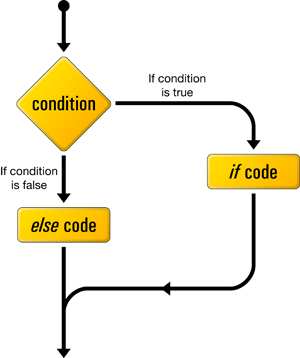
  • if...else statement - use this statement to execute some code if a condition is true and another code if the condition is false
  • if...elseif....else statement - use this statement to select one of several blocks of code to be executed
  • switch statement - use this statement to select one of many blocks of code to be executed

The if Statement

Use the if statement to execute some code only if a specified condition is true.

Syntax

if (condition) code to be executed if condition is true;
The following example will output "Have a nice weekend!" if the current day is Friday:
<html>
<body>

<?php
$d=date("D");
if ($d=="Fri") echo "Have a nice weekend!";
?>

</body>
</html>
Notice that there is no ..else.. in this syntax. The code is executed only if the specified condition is true.

The if...else Statement

Use the if....else statement to execute some code if a condition is true and another code if a condition is false.

Syntax

if (condition)
  {
  code to be executed if condition is true;
 
}
else
  {
  code to be executed if condition is false;
 
}

Example

The following example will output "Have a nice weekend!" if the current day is Friday, otherwise it will output "Have a nice day!":
<html>
<body>

<?php
$d=date("D");
if ($d=="Fri")
  {
  echo "Have a nice weekend!";
  }
else
  {
  echo "Have a nice day!";
  }
?>

</body>
</html>


The if...elseif....else Statement.

Use the if....elseif...else statement to select one of several blocks of code to be executed.

Syntax

if (condition)
  {
  code to be executed if condition is true;
 
}
elseif (condition)
  {
  code to be executed if condition is true;
 
}
else
  {
  code to be executed if condition is false;
  }

Example

The following example will output "Have a nice weekend!" if the current day is Friday, and "Have a nice Sunday!" if the current day is Sunday. Otherwise it will output "Have a nice day!":
<html>
<body>

<?php
$d=date("D");
if ($d=="Fri")
  {
  echo "Have a nice weekend!";
  }
elseif ($d=="Sun")
  {
  echo "Have a nice Sunday!";
  }
else
  {
  echo "Have a nice day!";
  }
?>

</body>
</html> 

A False If Statement

Let us now see what happens when a PHP if statement is not true, in other words, false. Say that we changed the above example to:

PHP Code:

$my_name = "anotherguy";

if ( $my_name == "someguy" ) {
 echo "Your name is someguy!<br />";
}
echo "Welcome to my homepage!";

Display:

Welcome to my homepage!
Here the variable contained the value "anotherguy", which is not equal to "someguy". The if statement evaluated to false, so the code segment of the if statement was not executed. When used properly, the if statement is a powerful tool to have in your programming arsenal!

PHP Operators - Examples | PHP Assignment - Arithmetic Operators list | PHP Comparison Operators - String Operators - Array Operators - Pre/Post-Increment and Pre/Post-Decrement.

n all programming languages, operators are used to manipulate or perform operations on variables and values. You have already seen the string concatenation operator "." in the Echo Lesson and the assignment operator "=" in pretty much every PHP example so far.

There are many operators used in PHP, so we have separated them into the following categories to make it easier to learn them all.


  • Assignment Operators
  • Arithmetic Operators
  • Comparison Operators
  • String Operators
  • Combination Arithmetic & Assignment Operators

Assignment Operators

Assignment operators are used to set a variable equal to a value or set a variable to another variable's value. Such an assignment of value is done with the "=", or equal character. Example:
  • $my_var = 4;
  • $another_var = $my_var;
Now both $my_var and $another_var contain the value 4. Assignments can also be used in conjunction with arithmetic operators.

Arithmetic Operators

OperatorEnglishExample
+ Addition 2 + 4
- Subtraction 6 - 2
* Multiplication 5 * 3
/ Division 15 / 3
% Modulus 43 % 10

PHP Code:

$addition = 2 + 4; 
$subtraction = 6 - 2; 
$multiplication = 5 * 3; 
$division = 15 / 3; 
$modulus = 5 % 2; 
echo "Perform addition: 2 + 4 = ".$addition."<br />"; 
echo "Perform subtraction: 6 - 2 = ".$subtraction."<br />"; 
echo "Perform multiplication:  5 * 3 = ".$multiplication."<br />"; 
echo "Perform division: 15 / 3 = ".$division."<br />"; 
echo "Perform modulus: 5 % 2 = " . $modulus 
 . ". Modulus is the remainder after the division operation has been performed.  
 In this case it was 5 / 2, which has a remainder of 1.";

Display:

Perform addition: 2 + 4 = 6
Perform subtraction: 6 - 2 = 4
Perform multiplication: 5 * 3 = 15
Perform division: 15 / 3 = 5
Perform modulus: 5 % 2 = 1. Modulus is the remainder after the division operation has been performed. In this case it was 5 / 2, which has a remainder of 1.

Comparison Operators

Comparisons are used to check the relationship between variables and/or values. If you would like to see a simple example of a comparison operator in action, check out our If Statement Lesson. Comparison operators are used inside conditional statements and evaluate to either true or false. Here are the most important comparison operators of PHP.
Assume: $x = 4 and $y = 5;
OperatorEnglish Example Result
== Equal To $x == $y false
!= Not Equal To $x != $y true
< Less Than $x < $y true
> Greater Than $x > $y false
<= Less Than or Equal To $x <= $y true
>= Greater Than or Equal To $x >= $y false

String Operators

As we have already seen in the Echo Lesson, the period "." is used to add two strings together, or more technically, the period is the concatenation operator for strings.

PHP Code:

$a_string = "Hello";
$another_string = " Billy";
$new_string = $a_string . $another_string;
echo $new_string . "!";

Display:

Hello Billy!

Combination Arithmetic & Assignment Operators

In programming it is a very common task to have to increment a variable by some fixed amount. The most common example of this is a counter. Say you want to increment a counter by 1, you would have:
  • $counter = $counter + 1;
However, there is a shorthand for doing this.
  • $counter += 1;
This combination assignment/arithmetic operator would accomplish the same task. The downside to this combination operator is that it reduces code readability to those programmers who are not used to such an operator. Here are some examples of other common shorthand operators. In general, "+=" and "-=" are the most widely used combination operators.
OperatorEnglish Example Equivalent Operation
+=Plus Equals $x += 2; $x = $x + 2;
-=Minus Equals $x -= 4; $x = $x - 4;
*=Multiply Equals $x *= 3; $x = $x * 3;
/=Divide Equals $x /= 2; $x = $x / 2;
%=Modulo Equals $x %= 5; $x = $x % 5;
.=Concatenate Equals $my_str.="hello"; $my_str = $my_str . "hello";

Pre/Post-Increment & Pre/Post-Decrement

This may seem a bit absurd, but there is even a shorter shorthand for the common task of adding 1 or subtracting 1 from a variable. To add one to a variable or "increment" use the "++" operator:
  • $x++; Which is equivalent to $x += 1; or $x = $x + 1;
To subtract 1 from a variable, or "decrement" use the "--" operator:
  • $x--; Which is equivalent to $x -= 1; or $x = $x - 1;
In addition to this "shorterhand" technique, you can specify whether you want to increment before the line of code is being executed or after the line has executed. Our PHP code below will display the difference.

PHP Code:

$x = 4;
echo "The value of x with post-plusplus = " . $x++;
echo "<br /> The value of x after the post-plusplus is " . $x;
$x = 4;
echo "<br />The value of x with with pre-plusplus = " . ++$x;
echo "<br /> The value of x after the pre-plusplus is " . $x;

Display:

The value of x with post-plusplus = 4
The value of x after the post-plusplus is = 5
The value of x with with pre-plusplus = 5
The value of x after the pre-plusplus is = 5
As you can see the value of $x++ is not reflected in the echoed text because the variable is not incremented until after the line of code is executed. However, with the pre-increment "++$x" the variable does reflect the addition immediately.

Array Operators

Operator Name Description
x + y Union Union of x and y
x == y Equality True if x and y have the same key/value pairs
x === y Identity True if x and y have the same key/value pairs in the same order and of the same types
x != y Inequality True if x is not equal to y
x <> y Inequality True if x is not equal to y
x !== y Non-identity True if x is not identical to y


PHP - Echo | How to print in PHP | PHP echo new line | php Echo Syntax - Function - Code - Example.

As you saw in the previous lesson, the PHP command echo is a means of outputting text to the web browser. Throughout your PHP career you will be using the echo command more than any other. So let's give it a solid perusal!

Outputting a String

To output a string, like we have done in previous lessons, use PHP echo. You can place either a string variable or you can use quotes, like we do below, to create a string that the echo function will output.

PHP Code:

<?php
$myString = "Hello!";
echo $myString;
echo "<h5>I love using PHP!</h5>";
?>

Display:

Hello!
I love using PHP!
 

Tips and Notes

Note: The echo() function is not actually a function, so you are not required to use parentheses with it. However, if you want to pass more than one parameter to echo(), using parentheses will generate a parse error.
Tip: The echo() function is slightly faster than print().
Tip: The echo() function has the following shortcut syntax. See example 5.

Example 1

<?php
$str = "Who's Kai Jim?";
echo $str;
echo "<br />";
echo $str."<br />I don't know!";
?>
The output of the code above will be:
Who's Kai Jim?
Who's Kai Jim?
I don't know!


Example 2

<?php
echo "This text
spans multiple
lines.";
?>
The output of the code above will be:
This text spans multiple lines.


Example 3

<?php
echo 'This ','string ','was ','made ','with multiple parameters';
?>
The output of the code above will be:
This string was made with multiple parameters


Example 4

Difference of single and double quotes. Single quotes will print the variable name, not the value:
<?php
$color = "red";
echo "Roses are $color";
echo "<br />";
echo 'Roses are $color';
?>
The output of the code above will be:
Roses are red
Roses are $color


Example 5

Shortcut syntax:
<html>
<body>

<?php
$color = "red";
?>

<p>Roses are <?=$color?></p>

</body>
</html>
 

Twitter Delicious Facebook Digg Stumbleupon Favorites More